
Features
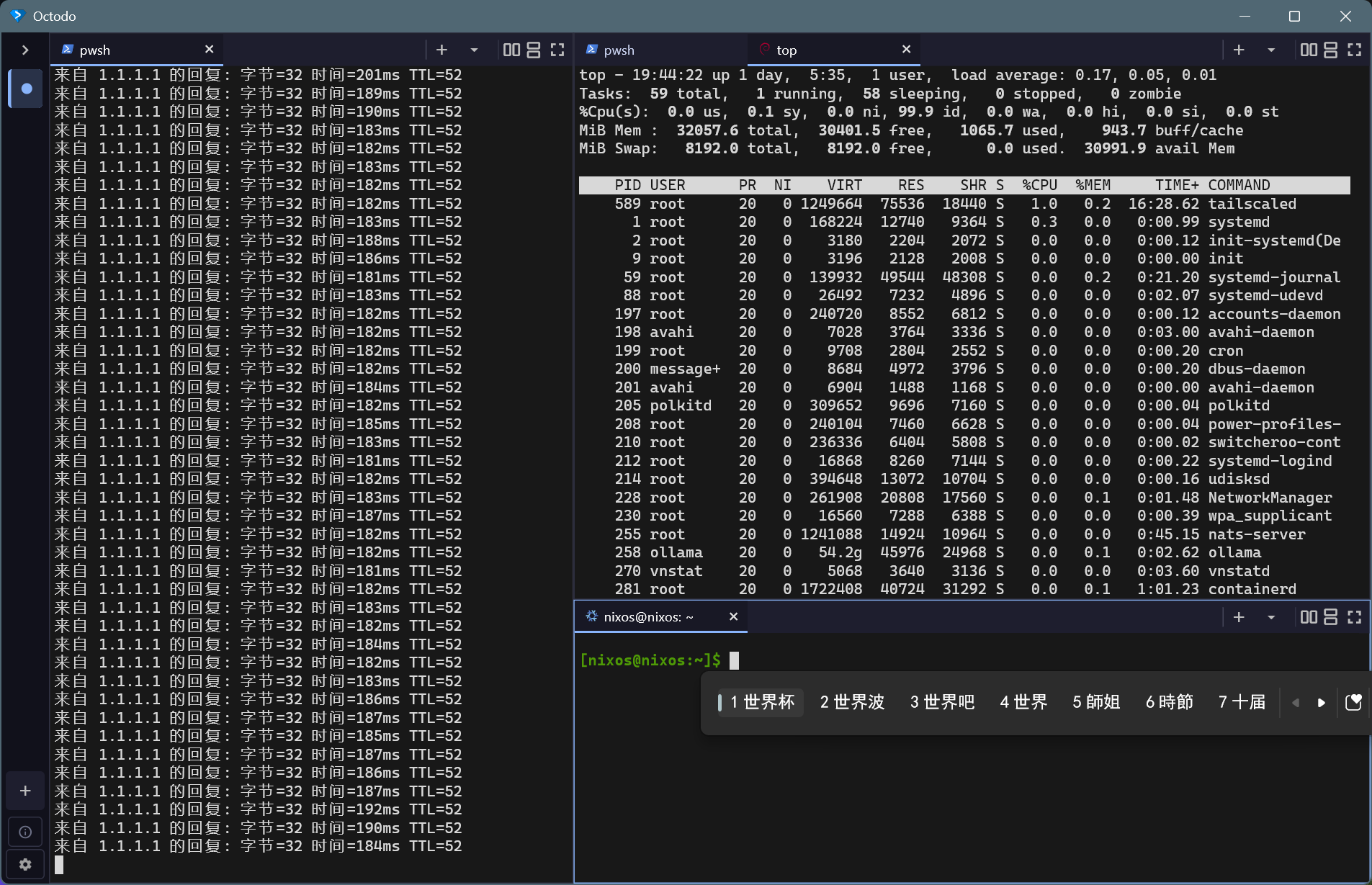
GPU · Alacritty rendering
Instant GPU rendering via the Alacritty core: sharp text, zero-stutter performance.
Native multi-pane and tabs with Flutter
Fluid multi-pane splits and flexible tab layouts, natively built for Windows, macOS, and Linux.
Keyboard-first, mouse-friendly
Shortcut-driven navigation, select-to-copy, right-click-to-paste, and drag-and-drop tab re-arrangement.
Smart notifications
Desktop notifications when long-running tasks finish or agents need attention, with unread badges everywhere.
Zero-config shell discovery
Auto-detects every local shell out of the box, with seamless WSL distribution integration.
IME input support
Full, native compatibility with multi-language IME inputs.
In-app auto-updates
Frictionless self-updates on Windows, macOS, and Linux.
Platform support
| Platform | Status |
|---|---|
| Windows | ✅ |
| macOS (Apple Silicon) | ✅ |
| Linux (x64 / arm64) | ✅ |
Install
Octodo is available from the Microsoft Store or as a Msix installer, a portable zip, a macOS dmg, and Linux AppImages. Updates are automatic: the Store version updates through the Store, and the others pick up the latest GitHub release in-app.
Windows
- Install from the Microsoft Store. Recommended
- Msix installer
- Download
Octodo-v<version>-windows-x64.Msixfrom Releases. - Double-click the Msix file to install.
- Download
- Portable version
- Download
octodo-v<version>-windows-x64.zipfrom Releases. - Before extracting, right-click the zip file → Properties → check Unblock → OK. This prevents Windows from blocking the network and shell-spawning APIs.
- Extract to any directory and run
octodo.exe.
- Download
macOS (Apple Silicon)
- Download
Octodo-v<version>-macos-arm64.dmgfrom Releases. - Double-click the dmg file, then drag
Octodo.appinto Applications.
If Gatekeeper blocks execution on first launch, clear the quarantine attribute via terminal:
xattr -dr com.apple.quarantine /Applications/Octodo.app
Linux (x64 / arm64)
- Download
octodo-v<version>-linux-x64.AppImage(x86_64) oroctodo-v<version>-linux-arm64.AppImage(aarch64) from Releases. - Make it executable, then run:
chmod +x octodo-v<version>-linux-x64.AppImage
./octodo-v<version>-linux-x64.AppImageInstall from Microsoft Store
- If the AppImage fails to launch, install FUSE 2 (
libfuse2) via your package manager, or run with--appimage-extract-and-run.- If startup crashes with
Failed to create EGL context/Check failed: gl_version_string(no usable OpenGL — typical in VMs without 3D acceleration or with a broken NVIDIA EGL), run in software-GL safe mode:./octodo-v<version>-linux-x64.AppImage --software-gl(orOCTODO_GL=software ./octodo-...AppImage). Rendering then uses the CPU (llvmpipe) — slower, but always works.- Optional: verify the download against the published
.sha256sidecar file.
Build from source
You’ll need the Flutter SDK (>= 3.44.0), the Rust toolchain (install via rustup), and the platform build tools — the Desktop development with C++ Visual Studio workload on Windows 10/11, or Clang, CMake, Ninja, and GTK3 development headers on Linux (sudo apt install clang cmake ninja-build pkg-config libgtk-3-dev), or Xcode Command Line Tools on macOS:
git clone https://github.com/invented-pro/octodo.git
cd octodo
flutter pub get
flutter run -d windows    # For Windows hosts
# or
flutter run -d linux      # For Linux hosts
# or
flutter run -d macos      # For macOS hosts
For unit tests, lint policies, and the fork-patch workflow, see CONTRIBUTING.md.
Keyboard shortcuts
Workspaces (sidebar)
| Windows / Linux | macOS | Action |
|---|---|---|
Ctrl+Shift+B | Cmd+Shift+B | Toggle workspace drawer |
Ctrl+Shift+N | Cmd+Shift+N | New workspace (auto-focus) |
Ctrl+Shift+W | Cmd+Shift+W | Close current workspace (confirm dialog) |
Ctrl+Shift+] | Cmd+Shift+] | Next workspace (cycle) |
Ctrl+Shift+[ | Cmd+Shift+[ | Previous workspace (cycle) |
Ctrl+Shift+1 … 9 | Cmd+Shift+1 … 9 | Jump to workspace N |
F11 | Ctrl+Cmd+F | Toggle fullscreen |
Ctrl+Shift+Q | Cmd+Shift+Q | Quit |
Panes (split + focus)
| Windows / Linux | macOS | Action |
|---|---|---|
Ctrl+Shift+D | Cmd+Shift+D | Split right |
Ctrl+Shift+E | Cmd+Shift+E | Split below |
Ctrl+Shift+↑ | Cmd+Shift+↑ | Focus pane above |
Ctrl+Shift+↓ | Cmd+Shift+↓ | Focus pane below |
Ctrl+Shift+← | Cmd+Shift+← | Focus pane to the left |
Ctrl+Shift+→ | Cmd+Shift+→ | Focus pane to the right |
Ctrl+Shift+M | Cmd+Shift+M | Toggle max of focused pane |
Tabs (within a pane)
| Windows / Linux | macOS | Action |
|---|---|---|
Ctrl+Shift+T | Cmd+Shift+T | New tab in focused pane |
Ctrl+Shift+K | Cmd+Shift+K | Close focused tab |
Ctrl+Tab | Cmd+Option+→ | Next tab in focused pane (cycle) |
Ctrl+Shift+Tab | Cmd+Option+← | Previous tab in focused pane |
Ctrl+1 … 9 | Cmd+1 … 9 | Jump to tab N |
Terminal engine (clipboard / zoom)
| Windows / Linux | macOS | Action |
|---|---|---|
Ctrl+Shift+C / Ctrl+Insert | Cmd+Shift+C / Cmd+Insert | Copy active selection |
Ctrl+V / Ctrl+Shift+V | Cmd+V / Cmd+Shift+V | Paste from clipboard |
Shift+Insert | Shift+Insert | Alternative paste |
PageUp / PageDown | PageUp / PageDown | Scroll view by single page |
Ctrl+= | Cmd+= | Increase font scale |
Ctrl+- | Cmd+- | Decrease font scale |
Ctrl+0 | Cmd+0 | Reset font scale |
Desktop notifications
Octodo watches every terminal for “needs attention” signals and posts a native desktop notification (with the Octodo icon) when you’re not looking at that terminal. Clicking the notification jumps straight back to the workspace → pane → tab that raised it. Controlled by Settings → General → Desktop notifications (on by default), with a sub-item for the minimum task duration.
What triggers a notification
| Source | Fires when | Notes |
|---|---|---|
| OSC 9 / OSC 777 / OSC 99 (kitty) | A tool or script emits a notification escape sequence | Agents (opencode, Claude Code, Codex CLI) and build scripts — see recipes below |
| BEL | A terminal emits the bell character | Gated by Terminal → Bell ≠ none |
| OSC 133 (shell integration) | A command you ran finishes | Octodo injects the marks into bash / zsh / fish / PowerShell prompts; only commands longer than the threshold (default 10 s) notify. CMD and Nushell are not covered |
Notifying from your own tools
# OSC 777 (title + body)
printf '\e]777;notify;Build Complete;All tests passed\e\\'

# OSC 9 (body only)
printf '\e]9;deploy done\e\\'

# OSC 99 (kitty protocol; title chunk + body chunk)
printf '\e]99;i=mytask:d=0;Build\e\\'
printf '\e]99;i=mytask:p=body:d=1;All tests passed\e\\'
opencode
opencode’s TUI has a built-in attention system — sounds and terminal notifications for question needs input, permission needs input, session error, and session done — but it is disabled by default. Enable it in ~/.config/opencode/tui.json:
{
  "$schema": "https://opencode.ai/tui.json",
  "attention": { "enabled": true }
}
Octodo implements both halves of the terminal contract opencode needs: it answers the kitty OSC 99 capability probe (how opencode delivers notifications) and reports terminal focus (CSI I / CSI O, DECSET 1004) so opencode knows the session is blurred.
Claude Code hook
~/.claude/settings.json — notify when a session finishes:
{
  "hooks": {
    "Stop": [
      {
        "matcher": "",
        "hooks": [
          {
            "type": "command",
            "command": "printf '\\e]777;notify;Claude Code;session complete\\a'"
          }
        ]
      }
    ]
  }
}
Notifications are suppressed while you’re looking at the terminal that raised them; unread counts show as a dot on the tab, a badge on the workspace tile, and a macOS dock / Windows taskbar badge.
Banners that don’t vanish
Windows, macOS, and Linux all auto-dismiss native banners after a few seconds. Octodo layers four mechanisms so an unattended notification stays impossible to miss:
- Persistent in-app banners — every notification also shows as a card in the top-right corner of the Octodo window, where it stays until you click it (jump to the terminal) or dismiss it. Repeated events from the same terminal coalesce into one card with a ×N counter.
- Re-alert until read — while a notification is still unread and Octodo is in the background, the banner is re-posted every 30 seconds (same id, so Notification Center replaces instead of stacking) until you click it, open the terminal, or swipe it away. Controlled by Settings → General → Keep re-alerting until read.
- Dock bounce (macOS) — a banner posted while Octodo is backgrounded also bounces the dock icon until you switch over.
- “Alerts” style (macOS) — for a banner that literally never auto-dismisses, switch Octodo to Alerts in System Settings → Notifications. Settings → General → Open system notification settings takes you there directly.
Credits
Terminal rendering is powered by Alacritty (MPL-2.0).
License
Released under the MIT License. Source code is available at invented-pro/octodo.